The philosophy behind Max
Most optimization advice tells you what to change without explaining why. That’s how you end up with a pile of tweaks and no understanding of the machine you’re adjusting. To build a properly optimized setup, you need a goal, rules for making decisions, and a method that accounts for the whole system. This is the framework behind Max.
Contents
Swipe horizontally to read the full page.
Page 1
Preface
A well-tuned machine is an undeniable requirement for any esports athlete. Proper
equipment is the backbone of any discipline. In strongman, proper gear can make the
difference between a 460kg and 505kg deadlift. In archery, an adjusted bow makes the
difference between a hit and a miss. In esports, having a well-tuned PC can be the
difference between underperforming and being the tournament MVP. It’s exactly why
you’re here.
This essay sets out the philosophy behind the FPSU Lab and the protocol Max applies. It
is for dedicated players, optimization nerds and anyone seeking clarity and objectivity.
The goal is to explain the principles of PC optimization, not just copy whichever tweak is
trending. It is for those who’ve felt confused by conflicting advice or frustrated by
shallow, surface-level reasoning.
What you’re about to learn isn’t taught anywhere else. It’s a fresh, completely unique
framework. By the end of this essay, you’ll have a precise understanding of what PC
optimization is, and you’ll gain a strong competitive edge over every opponent whose
setup isn’t properly optimized. Your input will always follow exactly your mouse or
controller. If you crave clarity and final answers, this framework delivers.
The framework moves from the goal to the rules, then to the system as a whole and the
order of execution. These are principles for designing a protocol, not instructions for the
reader to configure a PC manually. The Lab develops and verifies that protocol; Max
applies it. The distinction matters: understanding how a method is built is different from
having to carry out every step yourself.
We begin with the fundamentals of optimization: the goal, the rules and the structure
that guide protocol design. The following sections explain how those principles shape the
Lab’s decisions and the protocol Max applies.
As of today, anyone searching for peak PC performance would know the optimization
scene is an amateur fest. Reddit and forums are filled with outdated advice and non-
experts, YouTube and free guides are random bags of outdated tweaks for the most part.
And the paid done-for-you services are either overpriced recycled IT advice or just
completely opaque. The situation couldn’t be more clear: everything is ambiguous and
scammy at worst. And the growing demand for performance is fueling this chaos. I’ve
been there, sorting through the good, the bad and the ugly.
But optimizing computers is no longer casual garage tinkering. So I’m here to bring you
clarity and objectivity in this mess. It all begins with this essay, by a gamer, for gamers.
Yes, I use em dashes (—). No, AI didn’t write this book—they’re just useful.
FPSU-Philosophy 1
Page 2
The art of optimization
What optimization truly means
When money’s on the line, a skipped frame, an FPS drop, or a latency spike can cost you
the game. Crisp—low latency—aim and constant high frames are necessary to perform.
This is what optimization is about. At its core, optimization is the process of adjusting a
system’s components or designs to be as efficient, effective and functional as possible for
a set goal. Applying this concept to esports leads us to the art of optimization.
The art of optimization takes effort and requires a true, deep understanding of the
components you are adjusting. It isn't just pressing buttons or copying tweaks—it’s a set
of timeless universal rules and truths. A true artist must adapt, invent, and solve new
problems through experience and logic as they progress in their journey of acquiring a
deep understanding of their tools. They must always redefine and improve their own
processes. The art of optimization is a living system that demands discipline, mastery,
logic, and effort. The results of your protocols must be repeatable and elite; a true
optimizer's work is distinguishable from an amateur's experiments.
It is by this relentless thirst for truth—never accepting claims at face value, always
asking yourself why, testing and never being satisfied until your understanding of the
matter covers its entirety—that you will gain confidence in your art and achieve mastery.
Doubts must be clarified, questions must be answered, and holes in your knowledge must
be filled.
What a tweak is
A tweak is any change made to your setup. Changing a BIOS setting, installing a driver,
moving a fan, replacing a cable or adjusting your monitor all count. It doesn't need to be
hidden in the registry or packaged in a script to qualify. If you changed the setup, you
made a tweak.
The word tells you nothing about the quality of that change. A tweak can improve
performance, do nothing, or make your system worse. Calling it an optimization doesn't
magically make it one.
This distinction matters. We aren't collecting tweaks to make a list look impressive.
Every change must serve the goal, obey the Priority Stack and work with the rest of the
system. Knowing how to change a setting is easy. Understanding whether you should
change it is the optimizer's job.
FPSU-Philosophy 2
Page 3
The optimization framework
Before we examine the method, let's unpack the framework I built to turn the art of PC
optimization into a structured, repeatable process. This framework organizes all my
optimization knowledge into a logical, expandable blueprint. It's simple, yet allows for
the complexity and expandability required to achieve peak performance. Unlike school or
classic courses—where you’re left trying to connect the dots—I’ve done that work for you,
so that you can focus on what matters. And if you use this blueprint correctly, you can’t
fail.
Here’s how it works: The framework is layered into four major components—each
guiding the next—from abstract principles to practical execution. They are, in order:
Priority Stack →Axioms →Pillars →Optimization Stack
Like in any art form, it starts with the goal—the Priority Stack—it defines the purpose of
our optimization (e.g. stability over max FPS). Next, we set rules—the Axioms. Like
mathematical axioms, they are what makes our goal achievable; they are foundational
assumptions that are true within the system's logic. Then, we apply these rules through
the four Pillars, the categories in which optimization happens. And finally, the
Optimization Stack lays out the order in which to apply the framework in the real world,
ensuring completion of sub-pillars before moving on to the next ones.
This framework ties it all together, starting with a clear goal, defining rules to achieve it,
categorizing them, then execution. When mastered, this results in a perfectly optimized
system—every time. It’s the best approach out there, delivering clarity, objectivity and
results that surpass most conventional guides.
FPSU-Philosophy 3
Page 4
The Priority Stack
In esports, the goal of PC optimization is to maximize the player’s performance. So
building our goal based on the most impactful metrics is the most logical conclusion;
we’ll define it as a set of priorities—based on the most important factors we can adjust—
responsible for a player’s performance:
Perfect 1:1 input → Stability → Latency → FPS
FPSFPS
LatencyLatency
StabilityStability
PerfectPerfect 1:11:1 inputinput
This priority stack steers every following decision. It’s organized in a non-negotiable order. Violate
it and your results pay the cost.
Inside the Priority Stack
1:1 input
Your mouse input data must translate perfectly to the on-screen cursor. This principle
enables accurate aiming. Like an ON/OFF switch. This is why we can’t allow the slightest
compromise. This is exactly why it forms the bottom of the Priority Stack pyramid.
Stability
1:1 input has its own inherent stability requirement, but this extends that rule to every
layer above. Frame drops, lag spikes, or driver hiccups destroy player performance;
muscle memory is built on the promise of sameness. A single stutter at the wrong
millisecond undoes months of trained reflexes. Therefore, stability locks the entire stack
in place, second only to 1:1 input and non-negotiable.
FPSU-Philosophy 4
Page 5
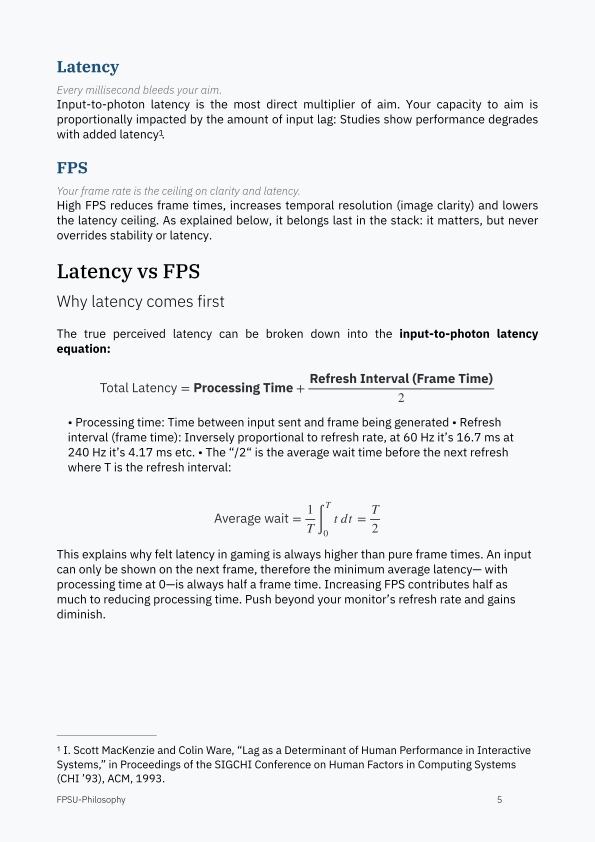
Latency
Every millisecond bleeds your aim.
Input-to-photon latency is the most direct multiplier of aim. Your capacity to aim is
proportionally impacted by the amount of input lag: Studies show performance degrades
with added latency1.
FPS
Your frame rate is the ceiling on clarity and latency.
High FPS reduces frame times, increases temporal resolution (image clarity) and lowers
the latency ceiling. As explained below, it belongs last in the stack: it matters, but never
overrides stability or latency.
Latency vs FPS
Why latency comes first
The true perceived latency can be broken down into the input-to-photon latency
equation:
Refresh Interval (Frame Time)
Total Latency = Processing Time + 2
• Processing time: Time between input sent and frame being generated • Refresh
interval (frame time): Inversely proportional to refresh rate, at 60 Hz it’s 16.7 ms at
240 Hz it’s 4.17 ms etc. • The “/2“ is the average wait time before the next refresh
where T is the refresh interval:
1 T T Average wait = t dt = T ∫0 2
This explains why felt latency in gaming is always higher than pure frame times. An input
can only be shown on the next frame, therefore the minimum average latency— with
processing time at 0—is always half a frame time. Increasing FPS contributes half as
much to reducing processing time. Push beyond your monitor’s refresh rate and gains
diminish.
1 I. Scott MacKenzie and Colin Ware, “Lag as a Determinant of Human Performance in Interactive
Systems,” in Proceedings of the SIGCHI Conference on Human Factors in Computing Systems
(CHI ’93), ACM, 1993.
FPSU-Philosophy 5
Page 6
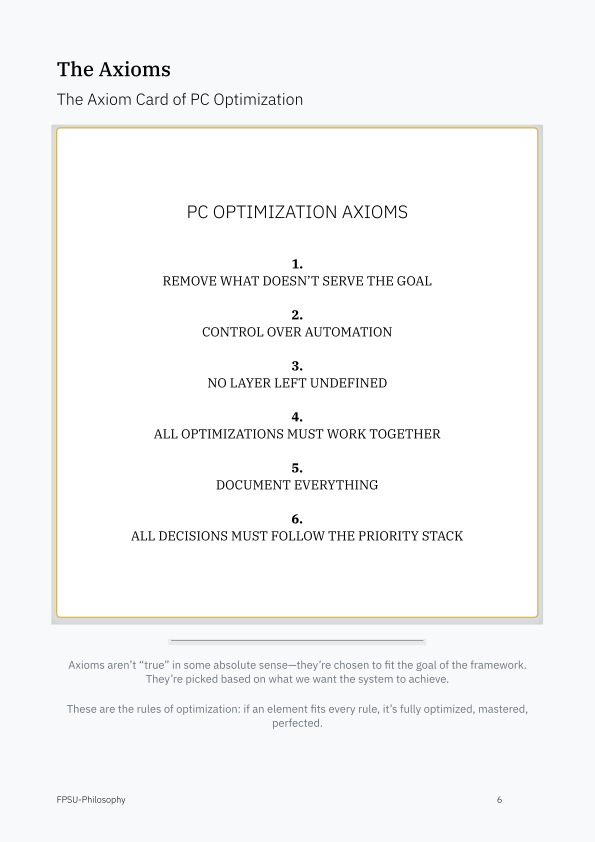
The Axioms
The Axiom Card of PC Optimization
PC OPTIMIZATION AXIOMS
1.
REMOVE WHAT DOESN’T SERVE THE GOAL
2.
CONTROL OVER AUTOMATION
3.
NO LAYER LEFT UNDEFINED
4.
ALL OPTIMIZATIONS MUST WORK TOGETHER
5.
DOCUMENT EVERYTHING
6.
ALL DECISIONS MUST FOLLOW THE PRIORITY STACK
Axioms aren’t “true” in some absolute sense—they’re chosen to fit the goal of the framework.
They’re picked based on what we want the system to achieve.
These are the rules of optimization: if an element fits every rule, it’s fully optimized, mastered,
perfected.
FPSU-Philosophy 6
Page 7
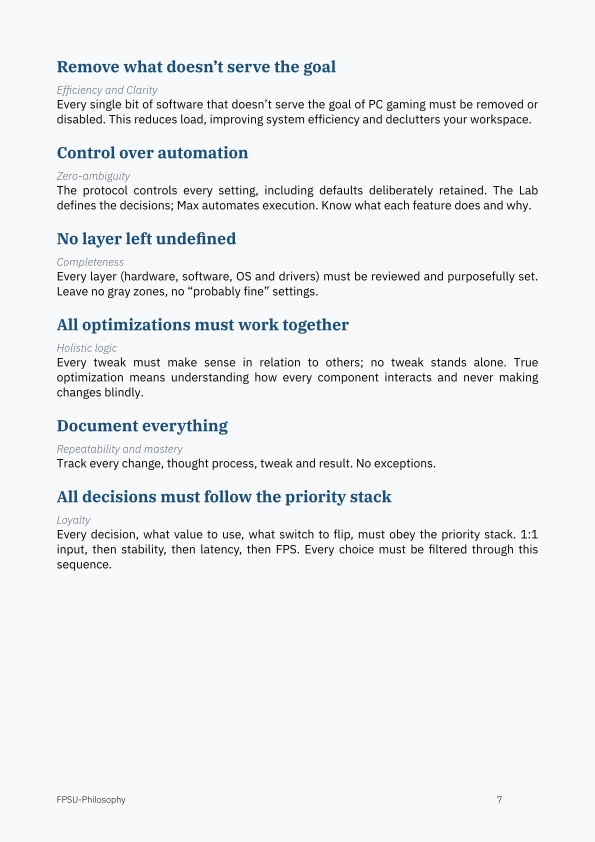
Remove what doesn’t serve the goal
Efficiency and Clarity
Every single bit of software that doesn’t serve the goal of PC gaming must be removed or
disabled. This reduces load, improving system efficiency and declutters your workspace.
Control over automation
Zero-ambiguity
The protocol controls every setting, including defaults deliberately retained. The Lab
defines the decisions; Max automates execution. Know what each feature does and why.
No layer left undefined
Completeness
Every layer (hardware, software, OS and drivers) must be reviewed and purposefully set.
Leave no gray zones, no “probably fine” settings.
All optimizations must work together
Holistic logic
Every tweak must make sense in relation to others; no tweak stands alone. True
optimization means understanding how every component interacts and never making
changes blindly.
Document everything
Repeatability and mastery
Track every change, thought process, tweak and result. No exceptions.
All decisions must follow the priority stack
Loyalty
Every decision, what value to use, what switch to flip, must obey the priority stack. 1:1
input, then stability, then latency, then FPS. Every choice must be filtered through this
sequence.
FPSU-Philosophy 7
Page 8
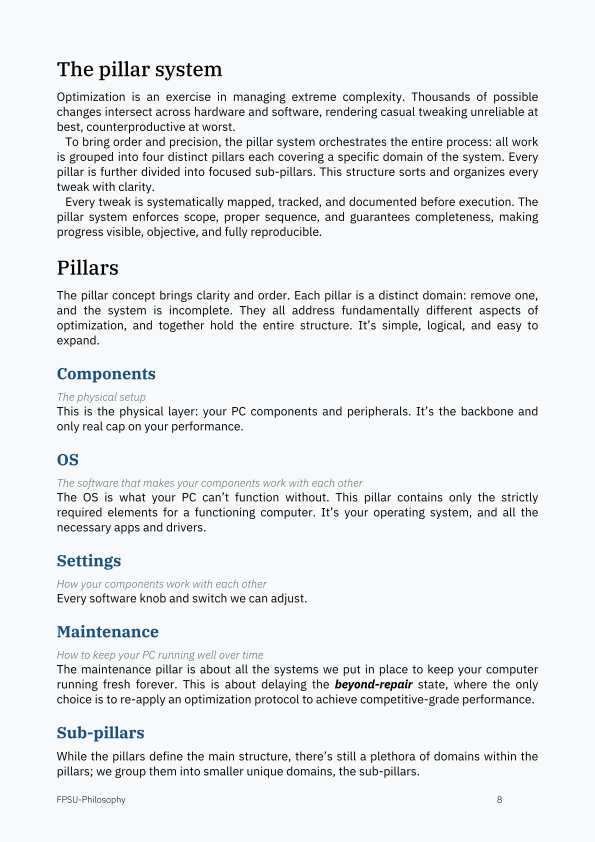
The pillar system
Optimization is an exercise in managing extreme complexity. Thousands of possible
changes intersect across hardware and software, rendering casual tweaking unreliable at
best, counterproductive at worst.
To bring order and precision, the pillar system orchestrates the entire process: all work
is grouped into four distinct pillars each covering a specific domain of the system. Every
pillar is further divided into focused sub-pillars. This structure sorts and organizes every
tweak with clarity.
Every tweak is systematically mapped, tracked, and documented before execution. The
pillar system enforces scope, proper sequence, and guarantees completeness, making
progress visible, objective, and fully reproducible.
Pillars
The pillar concept brings clarity and order. Each pillar is a distinct domain: remove one,
and the system is incomplete. They all address fundamentally different aspects of
optimization, and together hold the entire structure. It’s simple, logical, and easy to
expand.
Components
The physical setup
This is the physical layer: your PC components and peripherals. It’s the backbone and
only real cap on your performance.
OS
The software that makes your components work with each other
The OS is what your PC can’t function without. This pillar contains only the strictly
required elements for a functioning computer. It’s your operating system, and all the
necessary apps and drivers.
Settings
How your components work with each other
Every software knob and switch we can adjust.
Maintenance
How to keep your PC running well over time
The maintenance pillar is about all the systems we put in place to keep your computer
running fresh forever. This is about delaying the beyond-repair state, where the only
choice is to re-apply an optimization protocol to achieve competitive-grade performance.
Sub-pillars
While the pillars define the main structure, there’s still a plethora of domains within the
pillars; we group them into smaller unique domains, the sub-pillars.
FPSU-Philosophy 8
Page 9
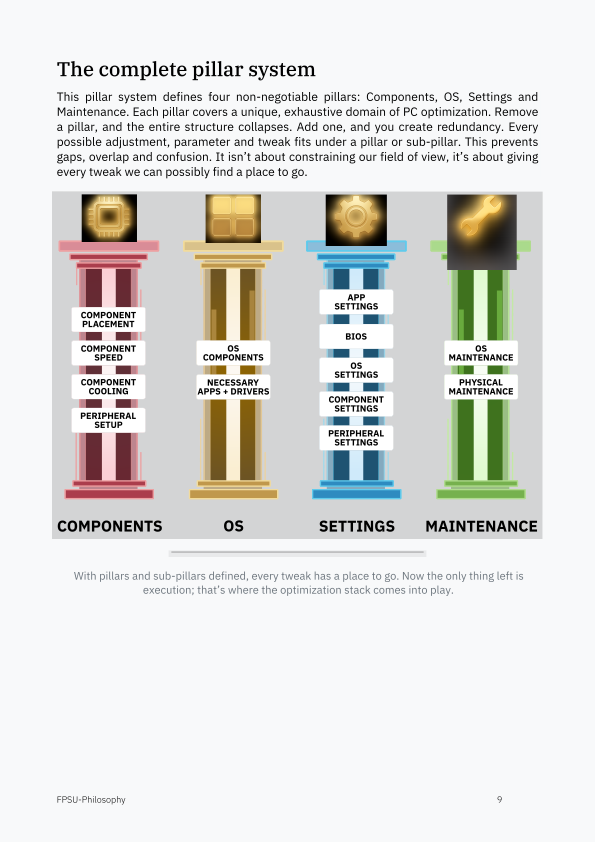
The complete pillar system
This pillar system defines four non-negotiable pillars: Components, OS, Settings and
Maintenance. Each pillar covers a unique, exhaustive domain of PC optimization. Remove
a pillar, and the entire structure collapses. Add one, and you create redundancy. Every
possible adjustment, parameter and tweak fits under a pillar or sub-pillar. This prevents
gaps, overlap and confusion. It isn’t about constraining our field of view, it’s about giving
every tweak we can possibly find a place to go.
APP
SETTINGS
COMPONENT
PLACEMENT
BIOS
COMPONENT OS OS
SPEED COMPONENTS MAINTENANCE
OS
SETTINGS
COMPONENT NECESSARY PHYSICAL
COOLING APPS + DRIVERS MAINTENANCE
COMPONENT
SETTINGS
PERIPHERAL
SETUP
PERIPHERAL
SETTINGS
COMPONENTS OS SETTINGS MAINTENANCE
With pillars and sub-pillars defined, every tweak has a place to go. Now the only thing left is
execution; that’s where the optimization stack comes into play.
FPSU-Philosophy 9
Page 10
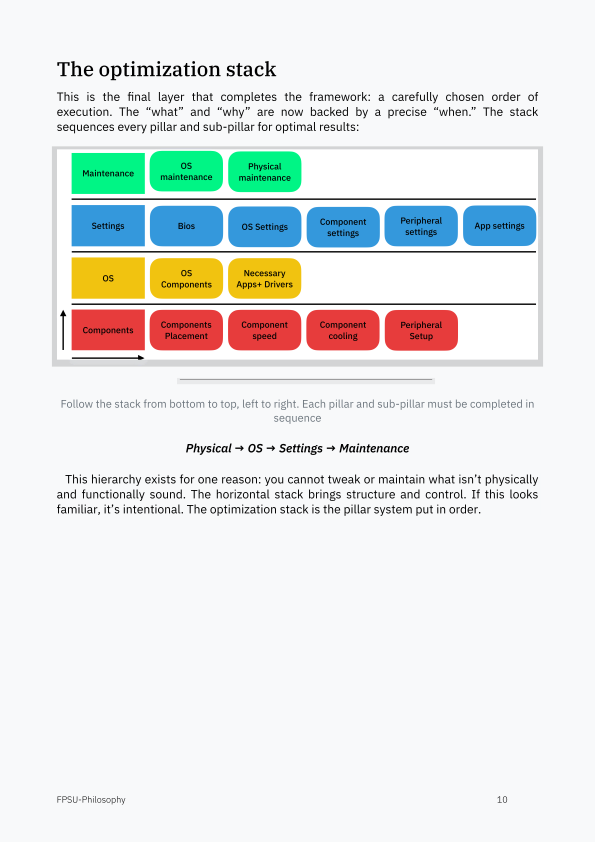
The optimization stack
This is the final layer that completes the framework: a carefully chosen order of
execution. The “what” and “why” are now backed by a precise “when.” The stack
sequences every pillar and sub-pillar for optimal results:
Follow the stack from bottom to top, left to right. Each pillar and sub-pillar must be completed in
sequence
Physical → OS → Settings → Maintenance
This hierarchy exists for one reason: you cannot tweak or maintain what isn’t physically
and functionally sound. The horizontal stack brings structure and control. If this looks
familiar, it’s intentional. The optimization stack is the pillar system put in order.
FPSU-Philosophy 10
Page 11
The complex reality
Real-world nuances
Tweak chains
Two steps ahead
A tweak chain is a sequence of related optimizations that often cross multiple pillars, and
sometimes can’t be addressed in strict stack order. The complexity comes from having to
optimize each link as you reach it—even if the chain isn’t completed until later in the
stack. We handle these chains by mapping them upfront, executing each step at the
optimal time and carefully documenting any intentional break in stack order.
Where games fit
Clean system first, games second
Games and applications are handled only after system optimization is complete; we
simply apply the same axioms to each app after optimization. Unless you’re doing
research, testing games mid-optimization is a waste of time.
About overclocking
The last 5%
Overclocking is outside the scope of this essay. It can provide measurable benefits but
only after the base system has been properly optimized. For 99% of users chasing
consistent, high-level esports performance, chasing an overclock before optimizing is
wasted effort or even counterproductive. Overclocking is off the table until every system
limiter is fully lifted. Once the rig is fully optimized, you’re free to see if extra frequency
yields lower frame times or is simply noise. It’s the last 5%. Optimize first, only overclock
if your system can actually handle it. Here’s why:
Overclocking is about forcing a slow system to run a bit faster, like speeding up a
10-step production line by 5% and expecting world-class results. Optimization, on the
other hand, is about cutting waste, like turning a production line from a 10-step to a
5-step process. Did we overclock? No. Did we get better results? Way better: we cut
inefficiencies at the source.
True optimization already increases power draw and heat substantially. In reality most
systems—when removing all limiters—lack the cooling margin to be fully optimized, let
alone overclocked. We focus on purity first. Only a select few can still overclock after an
aggressive optimization.
Optimization takes time
FPSU-Philosophy 11
Page 12
Modern gaming systems have thousands upon thousands of parameters. Perfectly
optimizing a system would take hundreds of hours. The best we can do is get as close to
this ideal, Breaking compatibility The more we push for extreme performance, the more
we’ll break compatibility. The perfectly optimized PC is effectively a shell that can only
run one task and only one, running the game to perfection. Unfortunately for us, running a
single game in kiosk mode isn’t practical for most of us, EVEN for a LAN PC that will only
be used to run one game for the majority of its use, players still need to adjust their
peripheral settings via different third-party apps. What does that mean for us? Well we
have to settle for the second best thing: maintaining compatibility for everything except
for the small exceptions where it’s fine to break Windows stuff. This way we don’t risk
compatibility risks cascading into a broken mess.
How much do components matter
Most people tend to think that there’s this magical tap of “optimization,” “just optimize
bro,” brutal. In reality while you can squeeze thousands of FPS in unrealistic scenarios,
these practices compromise our stability. This is why I will never tweak a client’s PC only
for FPS, because it would hurt his capacities as a player, even if he doesn’t get the
“number on screen went up by 10.”
Reinstalling Windows or cleaning it up?
A protocol needs a fresh Windows baseline. Max creates a separate installation; it
preserves the existing setup, files and games. People assume you can take an
unoptimized machine that’s been evolving into a web of chaos for years and magically
turn it into an elite performing setup. If you believe this you’re delusional.
DPC latency
DPC latency (deferred procedure call) is the time from an ISR firing to the completion of
the driver's deferred routine (the DPC).
It’s a good indicator of how smooth your PC is running at a deep level, how free your
deep driver processes are, how long they have to wait before they execute. It’s good to
keep this number low to keep the deep internal processes flowing. High DPC can
snowball into latency spikes.
Don’t obsess over measurements.
Measurements are useful when the question and the test are sound. The Lab must verify
the protocol with controlled comparisons. Someone applying a verified method does not
need to benchmark every tiny change. Many individual effects sit within measurement
noise; chasing those fluctuations wastes time. Measure to answer a question, not just to
watch a number move.
And also, getting + or - 10 FPS because of a tweak literally doesn’t matter on its own.
Optimizing based on measurements, while only looking at the FPS, DPC and latency
numbers, doesn’t mean anything and is likely counterproductive. This is how everybody
FPSU-Philosophy 12
Page 13
does it, because doing it smarter requires this knowledge set out in this essay that no one
has.
Chasing measurement noise wastes time; small effects need suitable tests. This is why
we have the set of universal rules that will always be true, it’s always true that reducing
CPU overhead and CPU cycles is good, it’s always true that you should always have the
fastest simplest render queue and so on. Of course when pushed to their limits, these
rules break because they are fake axioms; that’s where the role of the optimizer comes
in, his understanding of the art of optimization must be greater than these rules so that
he may overcome them and improve them.
About service count
Think of services like a field of grass. Thousands of short bits of grass are easy to
navigate. But a few big bits of grass slow us down instantly. It’s the same with Windows
services; what matters is not the number of processes alone, it’s how big those processes
are. You can have thousands of processes at idle and nothing’ll happen to you. But have 3
big ones and you’ll feel the slowdown. So yes, a smaller number is better, but the real
impact isn’t the amount of processes alone, it’s processes*size of the processes.
Can I use Wi-Fi?
Use Ethernet. Wi-Fi adds wireless connection management and can introduce contention
or interference. The extra services, driver overhead and impact on wireless peripherals
depend on the adapter, bands and setup.
Must you always go super hard and all in on everything?
The goal of this framework is to maximize player performance at all costs. For those who
want comfort AND good performance, it is completely achievable to optimize for comfort
and get decent performance. This is the ideal setup for streamers, for example, who need
their game to look pretty for viewers while enjoying elite-level performance. It also suits
those whose in-game damage does not determine whether they can put bread on the
table at the end of the week. A casual gamer who only uses his computer for a few
selected games would find this setup ideal, enjoying both reliable performance and
visuals at the cost of lost compatibility.
Computers slow down over time
A 6–12-month reset guideline is not an expiry date. Automated maintenance can extend
an installation’s useful life. Rebuild when its condition requires it, not just because time
has passed.
FPSU-Philosophy 13
Page 14
About core affinity
Core affinity is outside the scope of this essay. It is an important part of optimization, but
its complexity deserves a separate technical discussion. This document explains the
framework for making those decisions, rather than prescribing individual settings.
Setting confusion
What qualifies as a Windows setting or a component setting? How do you tell them apart?
The confusion comes from the fact that OS settings obviously impact the components.
What differentiates a component setting from an OS setting is how direct the impact is.
Does it directly impact a component? Then it’s a component setting. Does it directly
impact the OS but not components directly? Then it’s an OS setting. Does it directly
impact both a component and the OS? Then it’s a component setting.
Why being a latency maximalist is the wrong path
Minimizing latency above all is a false solution. It sounds like the correct mindset when
you don’t know better. But thinking this way will steer you down the wrong path. You
must understand every element of the machine you adjust in order to make the right
decision. Beware of the wins that seem too easy.
FPSU-Philosophy 14